

MAPAs
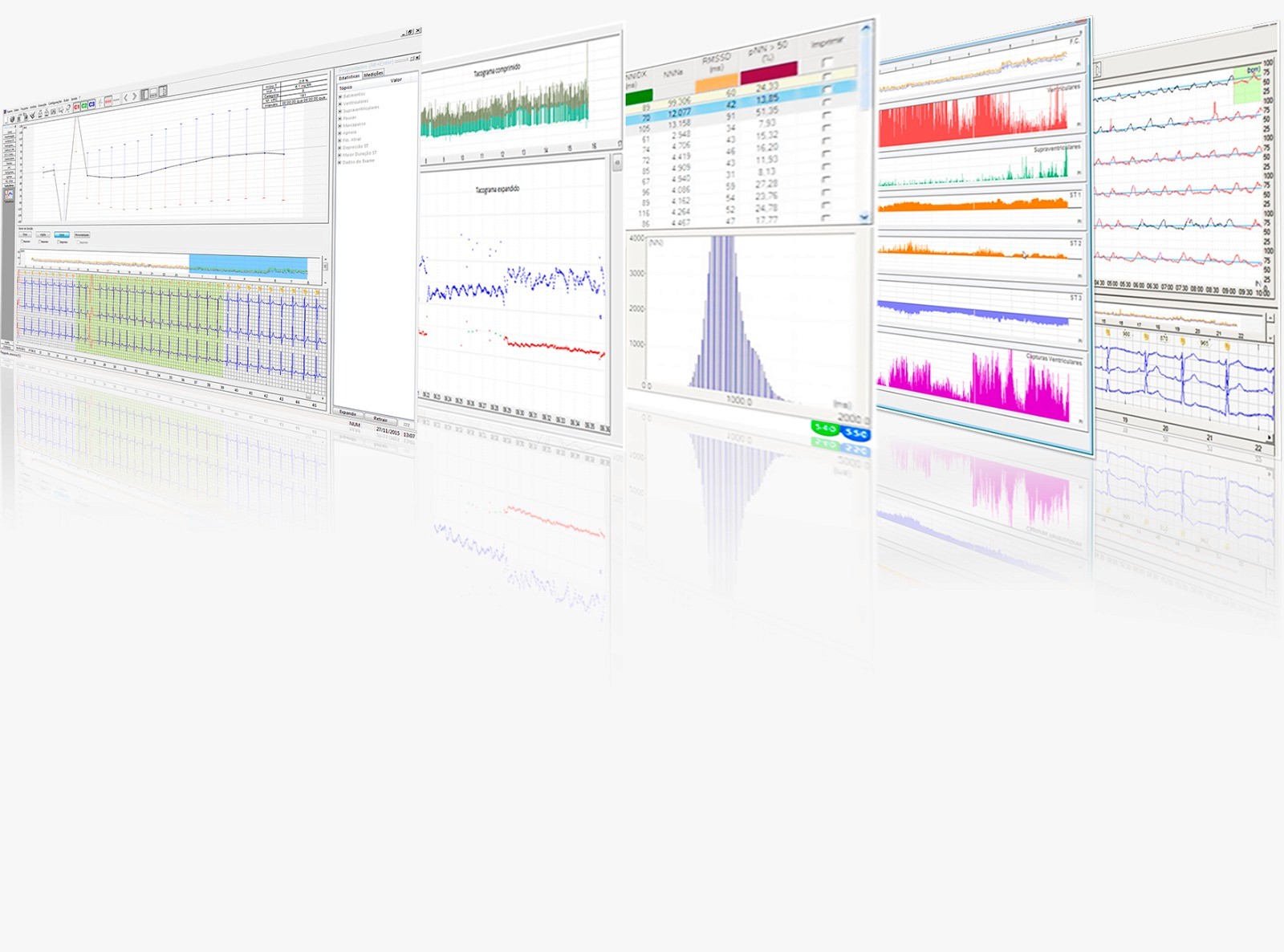
Comprehensive software for arterial hypertension analysis and pulse wave, with multiple visualization, editing, and customizable report tools for precise and detailed diagnosis.
MAP
Hypertension
High Precision
Report
Analysis
More about
See the details of this product. Discover everything it includes, its connectivity, compatibility, and other features.
Compatibility
Compatibility
Compatibility
Dyna-MAPA NG, Dyna-MAPA AOP, ARTERIS AOP, CardioMapa.
Connectivity
Connectivity
Connectivity
Local analysis on computer.
Warranty
Warranty
Warranty
Not applicable (Software).
Technical Support
Technical Support
Technical Support
Available through official channels.
ANVISA Registration
ANVISA Registration
ANVISA Registration
Not applicable (Software).
Included Items
Included Items
Included Items
Software usage license.


Main Differentials
Each piece of equipment is designed to optimize its diagnosis, combining robust analysis with agile operation and ideal cost-effectiveness for clinical routines.
1
1
2
2
3
3
Full View
Full View
Analyze the data with Pressure Curve graphs, Trends, Correlation, and Histograms.
Flexible Edition
Flexible Edition
Register patients, doctors, and medications. Create multiple headers and measurement protocols.
Comparative Analysis
Allows the overlap of curves from two exams of the same patient to evaluate the evolution.
Frequently Asked Questions


What is the purpose of the M.A.P.A.s software?
It is software for the analysis of Ambulatory Blood Pressure Monitoring (ABPM) and Pulse Wave Analysis (PWA).
What are the main ways to visualize the data?
The software offers Pressure Curve Charts, Trend Charts, Correlation Charts, Histograms, and Tabular Report.
Is it possible to compare exams of the same patient?
Yes, one of the features is the ability to overlay the curves of two different tests of the same patient for comparative analysis.
Can I customize reports for different doctors?
Yes, the system allows the registration of multiple report headers that can be associated with the requesting physician of the exam.
Is it possible to create custom measurement protocols?
Yes, the doctor can schedule a large number of protocols, with up to 6 programmable periods in 24 hours and configurable intervals.
Is there a version for integration with hospital systems?
Yes, the DICOM MAPAs version enables integration with hospital DICOM systems, allowing the retrieval of worklists and exporting the report to the PACS.
What is the purpose of the M.A.P.A.s software?
It is software for the analysis of Ambulatory Blood Pressure Monitoring (ABPM) and Pulse Wave Analysis (PWA).
What are the main ways to visualize the data?
The software offers Pressure Curve Charts, Trend Charts, Correlation Charts, Histograms, and Tabular Report.
Is it possible to compare exams of the same patient?
Yes, one of the features is the ability to overlay the curves of two different tests of the same patient for comparative analysis.
Can I customize reports for different doctors?
Yes, the system allows the registration of multiple report headers that can be associated with the requesting physician of the exam.
Is it possible to create custom measurement protocols?
Yes, the doctor can schedule a large number of protocols, with up to 6 programmable periods in 24 hours and configurable intervals.
Is there a version for integration with hospital systems?
Yes, the DICOM MAPAs version enables integration with hospital DICOM systems, allowing the retrieval of worklists and exporting the report to the PACS.
What is the purpose of the M.A.P.A.s software?
It is software for the analysis of Ambulatory Blood Pressure Monitoring (ABPM) and Pulse Wave Analysis (PWA).
What are the main ways to visualize the data?
The software offers Pressure Curve Charts, Trend Charts, Correlation Charts, Histograms, and Tabular Report.
Is it possible to compare exams of the same patient?
Yes, one of the features is the ability to overlay the curves of two different tests of the same patient for comparative analysis.
Can I customize reports for different doctors?
Yes, the system allows the registration of multiple report headers that can be associated with the requesting physician of the exam.
Is it possible to create custom measurement protocols?
Yes, the doctor can schedule a large number of protocols, with up to 6 programmable periods in 24 hours and configurable intervals.
Is there a version for integration with hospital systems?
Yes, the DICOM MAPAs version enables integration with hospital DICOM systems, allowing the retrieval of worklists and exporting the report to the PACS.
Essential Documents
Access complete and reliable materials about the equipment, including technical information, usage instructions, and clinical details. Download the official files and always have everything you need at hand to support your medical practice.
Informative Brochure
A quick and attractive overview with key benefits, features, and clinical applications. Ideal for the initial presentation of the product.
7.1 MB
Informative Brochure
A quick and attractive overview with key benefits, features, and clinical applications. Ideal for the initial presentation of the product.
7.1 MB
Informative Brochure
A quick and attractive overview with key benefits, features, and clinical applications. Ideal for the initial presentation of the product.
7.1 MB
Technical Sheet
Detailed specifications, performance, and certifications of the product. Essential for professional evaluation.
2.4 MB
Technical Sheet
Detailed specifications, performance, and certifications of the product. Essential for professional evaluation.
2.4 MB
Technical Sheet
Complete detailing of the technical specifications, performance, and certifications of the product.
2.4 MB
Instruction Manual
Guide for installation, configuration, and proper use of the device, ensuring safety and reliability in the results.
10.8 MB
Instruction Manual
Guide for installation, configuration, and proper use of the device, ensuring safety and reliability in the results.
10.8 MB
Instruction Manual
Guide for installation, configuration, and proper use of the device, ensuring safety and reliability in the results.
10.8 MB
Ready to optimize your diagnoses?
Request a personalized quote or contact us to speak with a specialist and clear up all your questions.
Contact
(11) 3883-3000
assistec@cardios.com.br
Service
Technical Support